
Workflow automation & data integration
Workflow automation
for small teams.
One recurring task that someone still does by hand, turned into something that runs, with a check before the result is used.
THE PROBLEM
Information arrives in one place and is needed in another.
Many small teams lose hours every week to the same steps: export, copy, retype, check, send. The data is already there. It sits in the wrong place or in the wrong shape. We connect what comes in to the result you need: collected, cleaned, checked and reported, with a person still in control of what gets used.
- Intake, routing and data collection
- Filtering, deduplication and integration between tools
- Imports, exports and reports
Tasks that fit
- A report put together by hand from several exports
- Requests that arrive by email and get retyped into a sheet
- One list kept in two systems and synced by copy and paste
- New entries checked by hand against old ones to see what changed
Start small: Workflow Fix
The smallest project we take is one task, automated end to end. We take two a month.
- One task, automated from input to result
- A check step before the result is used
- Handover notes for whoever runs it
- A fixed price, agreed before any work starts
FROM OUR WORK
See similar work.
Short videos and project pages from work we have already built.
- Cash Desk drafts reminders for overdue invoices in English or Czech, follows payments and keeps a 13-week cash view; a person approves every send. A prototype on fictional data.
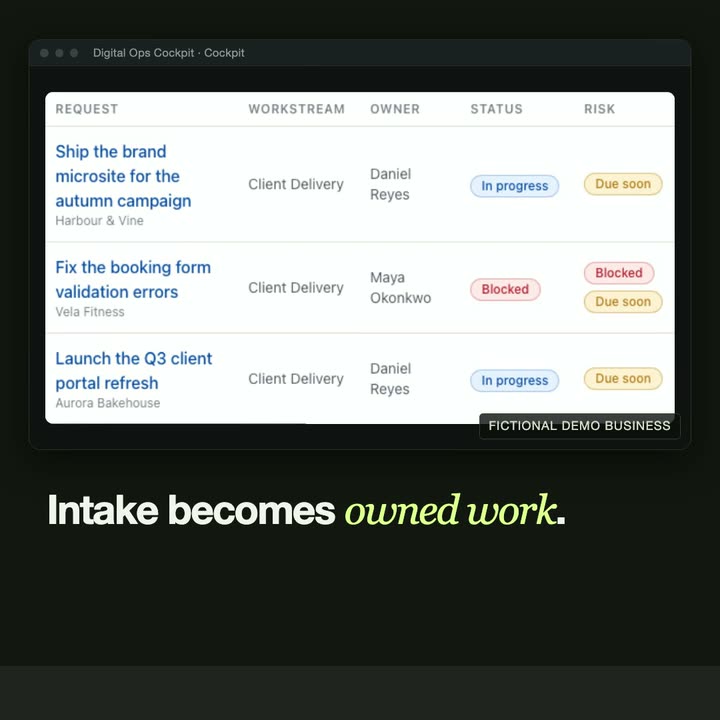
- Digital Ops Cockpit turns incoming requests into owned work, with routing rules, deadlines and a weekly digest. A demonstration built around a fictional business.
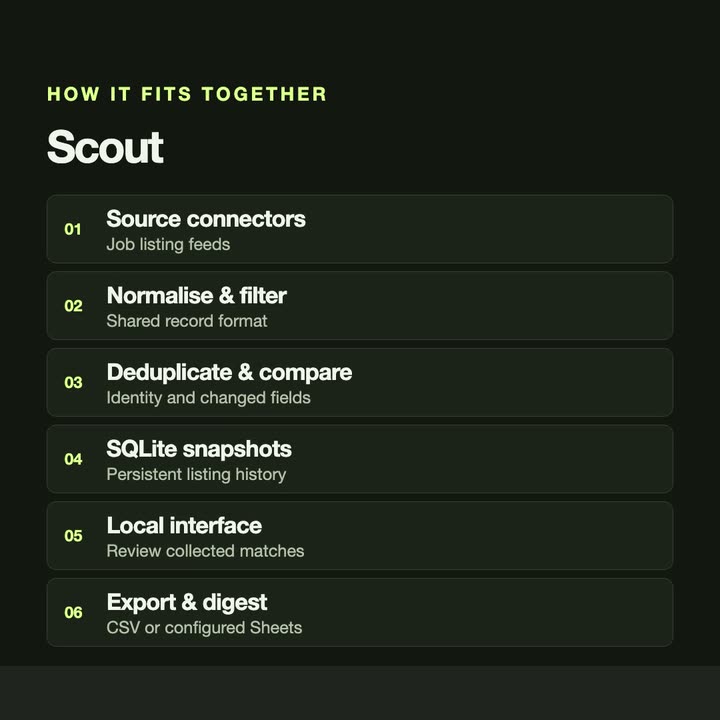
- Scout collects job listings from several sources, removes duplicates and reports what actually changed, as CSV or in a spreadsheet.
- Shift Brief assembles an operational brief from read-only business records and checks each fact against its source. A prototype on synthetic data.
GUIDES
Read first.
- How to test an automation before you rely on it Before an automation replaces a manual task: run both side by side, compare the results, test the awkward cases and decide who hears when it fails.
- How to check a report's figures against the source before it goes out Before a client report goes out, compare each total with the source system's own report, stop on any difference and fix the cause, not the figure.
- How to choose what to automate first A simple way to pick the first task to automate: how often it happens, how long it takes, what a mistake costs and how clear its rules are.
- How to match payments to invoices before sending reminders Check the bank statement against open invoices before chasing anyone: mark paid only what is certain, ask a person about the rest, then remind.
- How to automate a weekly report built from several exports Turn a weekly report built by hand from several exports into one that builds itself: collect the files, combine them, check the numbers, then send.
- How to turn incoming emails into spreadsheet rows Stop retyping requests from email into a sheet: use a form where you can, then rules, scripts or an integration tool, with a check for anything unclear.
- How to stop copying data between spreadsheets End copy and paste between spreadsheets: pick one source of truth, use the links your spreadsheet already has, or automate the transfer with a check.
- How to write a software brief in four questions A software brief does not need a template. Answer four questions: the task, the tools, the result and the timing. With examples you can copy.
WORKING TOGETHER
Start with the problem.
Four steps. Nothing is built before the scope and the quote are agreed.
- 01
Share your brief
Email the problem, who the tool is for and what you need it to do. Existing tools or examples help.
- 02
Define the scope
Discuss requirements, constraints and deliverables. Agree a quote and approach before work begins.
- 03
Build & review
Review the work against the agreed scope and give feedback as the application takes shape.
- 04
Delivery & handover
Receive the agreed deliverables. Discuss setup, documentation and any further support your project needs.
QUESTIONS
Before you write.
- What does a workflow automation cost?
- It depends on the task, so every project is quoted after we read your email. Workflow Fix has a fixed price; larger projects get a quote. Either way, the price is agreed before any work starts.
- Which tools can you connect?
- Usually whatever holds the data today: spreadsheets, CSV exports, email, databases and web services with an API. Name the tools in your email and we will say what is possible.
- Do we have to change how we work?
- Usually not. The automation takes over the repetitive steps and fits around the tools you already use.
- What if the automation gets something wrong?
- Every Workflow Fix includes a check step before the result is used, and the handover notes say what to look at. A person decides what gets sent or saved.
- How do we start?
- Send one email with four things: the task, the tools you use today, what a good result looks like and when you need it. We answer by email, with questions or with a scope and a quote.
START WITH ONE EMAIL
Tell us about
the task.
Four lines are enough. We answer by email, with questions or with a scope and a quote.
There is no form to fill in and nothing to sign up for.
WHAT TO PUT IN IT
- The taskWhat is done by hand today, and how often.
- The toolsWhere the data lives: files, sheets, apps.
- The resultWhat a good outcome looks like for you.
- The timingWhen you need it.
The button opens your email app with the four questions already in the message. Examples: how to write a software brief.