
 SYSTEM ARCHITECTURE
THE PROJECT
Job collection, filtering, deduplication and change reporting through a local pipeline.
Source connectors collect listings into a common format. Filters narrow the results, persistent identifiers reduce duplicates and stored snapshots distinguish new opportunities from meaningful changes. CSV, digest and configured spreadsheet outputs turn the collected data into a usable workflow.
- Pluggable job-source connectors
- Normalization, filters and change detection
- Local browser interface, CSV and optional Sheets
Independent project built as Job Board Scraper. Spreadsheet output requires its own configuration.
IN MOTION
Watch the project.
UNDER THE SURFACE
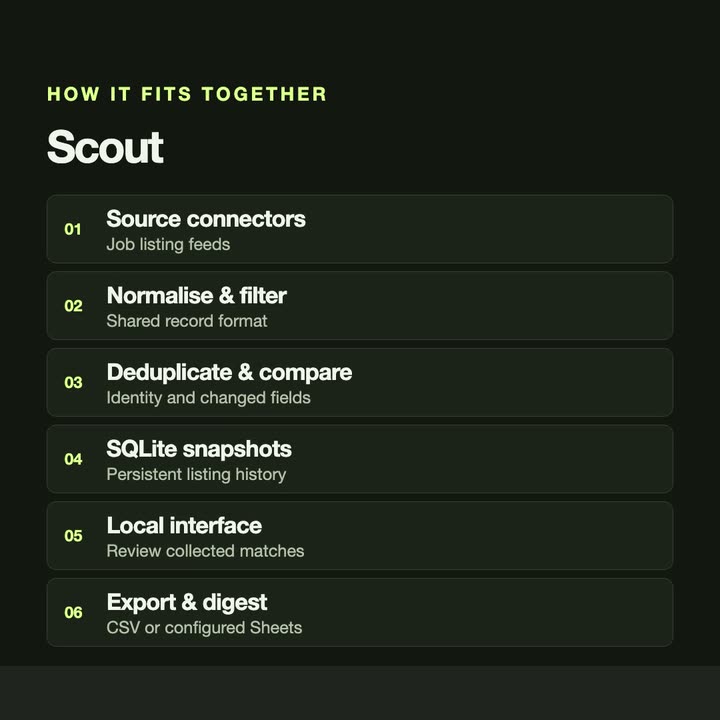
How it fits together.
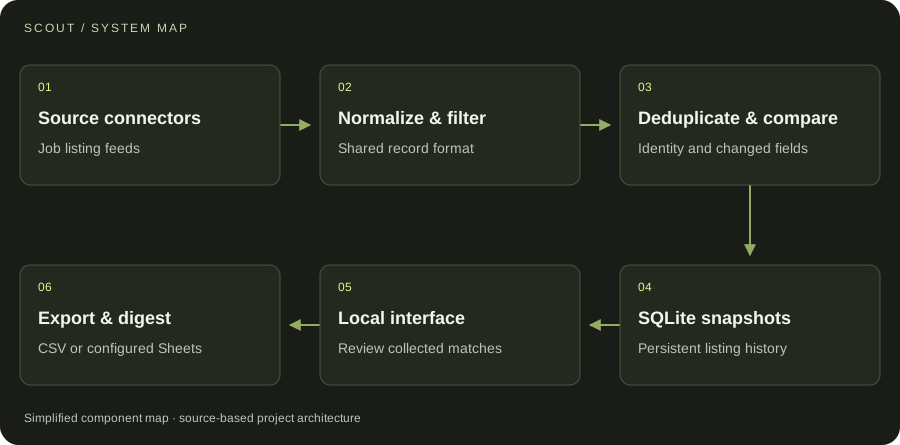
Source-specific collectors feed a common normalization pipeline. Persistent snapshots support deduplication and change-aware outputs.
Swipe or scroll the diagram to inspect it. The components are also listed below.
- 01Source connectors
Job listing feeds
- 02Normalize & filter
Shared record format
- 03Deduplicate & compare
Identity and changed fields
- 04SQLite snapshots
Persistent listing history
- 05Local interface
Review collected matches
- 06Export & digest
CSV or configured Sheets
START WITH ONE EMAIL
Need something
like this?
Tell us what you would use it for. The four lines on the right are enough to start.
There is no form to fill in and nothing to sign up for.
WHAT TO PUT IN IT
- The taskWhat is done by hand today, and how often.
- The toolsWhere the data lives: files, sheets, apps.
- The resultWhat a good outcome looks like for you.
- The timingWhen you need it.
The button opens your email app with the four questions already in the message. Examples: how to write a software brief.