
Workflow prototype
Cash Desk
Overdue invoices chased in drafts. A person approves every send.
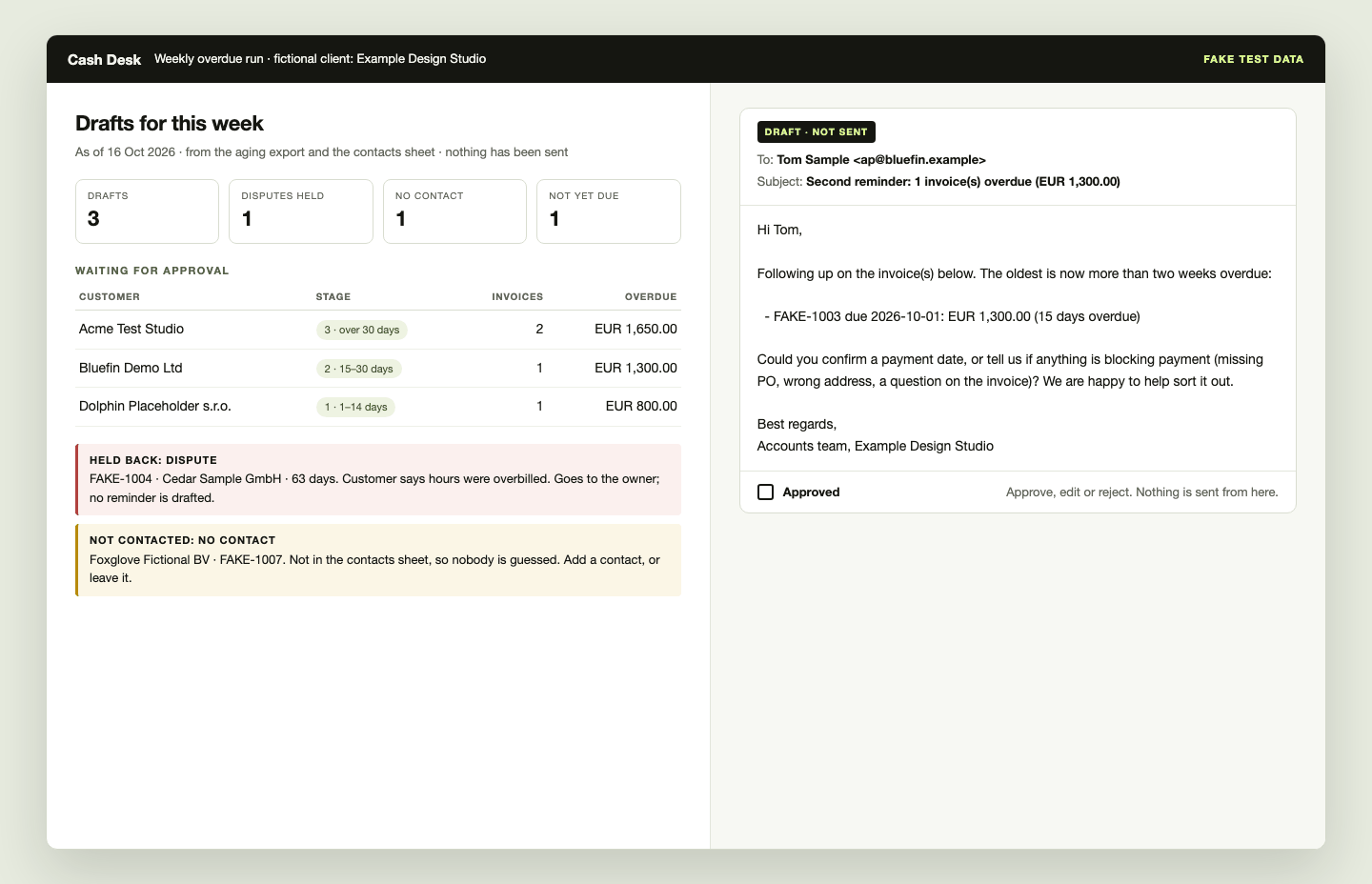 PROJECT SCREEN
THE PROJECT
Reminder drafts that follow payments, a monthly client report and a 13-week cash view, all waiting for approval.
Each week the desk reads an accounts-receivable aging export and a contacts sheet and drafts one reminder per customer, in three stages set by the oldest invoice, in English or Czech by the contact's language. Payment events keep the queue current: a payment cancels the pending reminder and drafts a receipt, a part payment gets a receipt that says what is still due, and a voided invoice ends the chase. A disputed invoice holds that customer for the owner, and a customer with no contact is listed rather than guessed. Each month it turns the books into a one-page report per client, and each Monday into a 13-week cash view whose assumptions come from recent receipts and are printed under the chart.
- Reminder drafts in three stages, in English or Czech, each marked not sent
- Payments cancel or redraft the pending reminder; part payments get a receipt that states the rest
- Disputed and voided invoices never get a reminder
- Customers without a contact listed, never guessed
- A one-page monthly report per client and a 13-week cash view, each approved before it goes out
Prototype run on fictional test data only; it has not run for a client. Nothing is sent: drafts and reports wait for a person. Going live takes read-only exports from the client, Gmail drafts that a person sends, and a signed data processing agreement.
CASE STUDY
Problem, approach, result.
The problem
Late invoices quietly strain the cash of a small business. Chasing them is awkward, gets pushed aside, and nobody has a clear weekly view of who owes what.
The approach
Each week the aging export and the contacts sheet go in, and one reminder draft per customer comes out, in three stages set by the oldest invoice and in the customer's language. A disputed invoice and a customer with no contact go to a person instead of getting an email.
Between those runs, payment events update the queue: a payment cancels the reminder and drafts a receipt, a part payment gets a receipt that states what is still due, and a voided invoice withdraws its reminder.
Each month the books become a one-page report per client, and each Monday a 13-week cash view built from recent receipts. A person ticks a checklist for every client before anything goes out.
The result
A working prototype, run on fictional test data: three reminder drafts, one dispute held back, one customer listed for a missing contact; on the payment events, a reminder cancelled by a payment, one redrafted after a part payment and a voided invoice's reminder withdrawn; two client reports and a 13-week cash view waiting for approval. Nothing was sent, and it has not run for a client yet.
Related service: Workflow automation & data integration →
THE WORKFLOWS
What the desk runs.
14 workflows so far, each run on made-up test data. Every one stops for a person before anything goes out. The newest are below.
Collections
- Morning briefEach weekday morning, lists new payments, newly overdue invoices and replies to reminders, in English or Czech.A person reads every reply; a dispute puts that customer on hold and marks their pending drafts not to approve.
- Payment matchingMatches incoming bank and card payments to open invoices, so reminders stop for invoices that are paid.A person confirms every uncertain match, refund and short payment; until they do, no reminder goes out for an invoice that payment may cover.
- Payment eventsA payment cancels the pending reminder and drafts a receipt; a part payment gets a receipt that states what is still due; a voided invoice ends the chase.A person approves every receipt and redrafted reminder; an event the desk does not know holds the invoice for them.
Reporting
- Ledger report checkChecks a report's totals against the accounting system's own report before the draft is written.A person fixes any figure that does not agree; the report still waits for approval.
- Monthly activity logCounts what each desk workflow actually produced for a client in the month, and flags runs that reported success but produced nothing.A person checks and ticks the log before it is attached to the client's monthly report.
- Monthly report against goalsCompares a client's month with its own goals and last month's approved figures, and leaves a comments section for the team.A person fills in the comments and approves the draft; only an approved draft sets next month's comparison figures.
Controls
- Bank access approvalsKeeps a register of each client's read-only bank-feed consents, refuses a bank read without a valid one and logs every check.Renewal requests wait as drafts until a person approves them and the client signs.
THE INTERFACE
A closer look.
UNDER THE SURFACE
How it fits together.
Local scripts read exports and payment events the client provides; nothing holds a login or calls an API. The monthly report and the cash view come from the same records. Going live would add read access to the contacts sheet and the accounting system, and save approved drafts in Gmail for a person to send.
Swipe or scroll the diagram to inspect it. The components are also listed below.
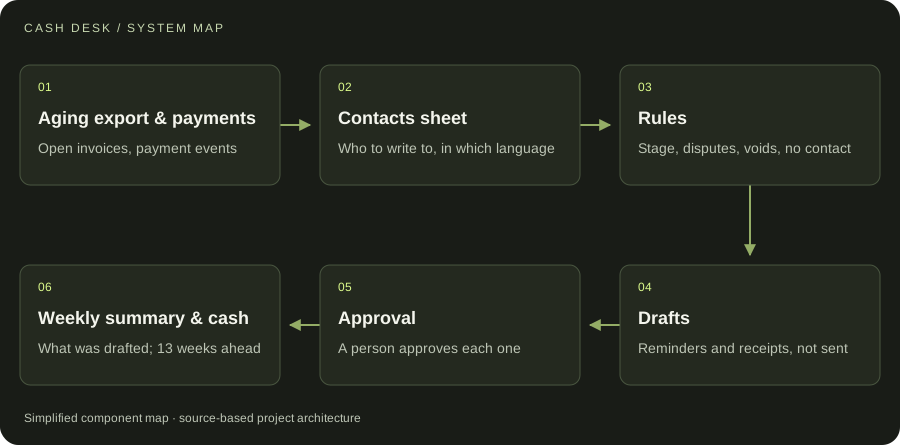
- 01Aging export & payments
Open invoices, payment events
- 02Contacts sheet
Who to write to, in which language
- 03Rules
Stage, disputes, voids, no contact
- 04Drafts
Reminders and receipts, not sent
- 05Approval
A person approves each one
- 06Weekly summary & cash
What was drafted; 13 weeks ahead
START WITH ONE EMAIL
Need something
like this?
Tell us what you would use it for. The four lines on the right are enough to start.
There is no form to fill in and nothing to sign up for.
WHAT TO PUT IN IT
- The taskWhat is done by hand today, and how often.
- The toolsWhere the data lives: files, sheets, apps.
- The resultWhat a good outcome looks like for you.
- The timingWhen you need it.
The button opens your email app with the four questions already in the message. Examples: how to write a software brief.