
Agent tooling
Hermes Operator Controls
Give an agent boundaries you can inspect.
 SYSTEM ARCHITECTURE
THE PROJECT
Plugin patterns for tool budgets, metadata telemetry and typed verification records.
Agent control is easier to reason about when limits and evidence are represented as explicit records. These plugin patterns count tool activity, check the next tool boundary and record verification results. Metadata-focused telemetry can describe behavior without copying full prompt or response content into the log.
- Tool-budget checks at the next boundary
- Hash-linked metadata event records
- Typed verification and PASS gates
Original plugin work for the upstream Hermes agent. Tool limits do not claim to interrupt inference already in progress.
IN MOTION
Watch the project.
UNDER THE SURFACE
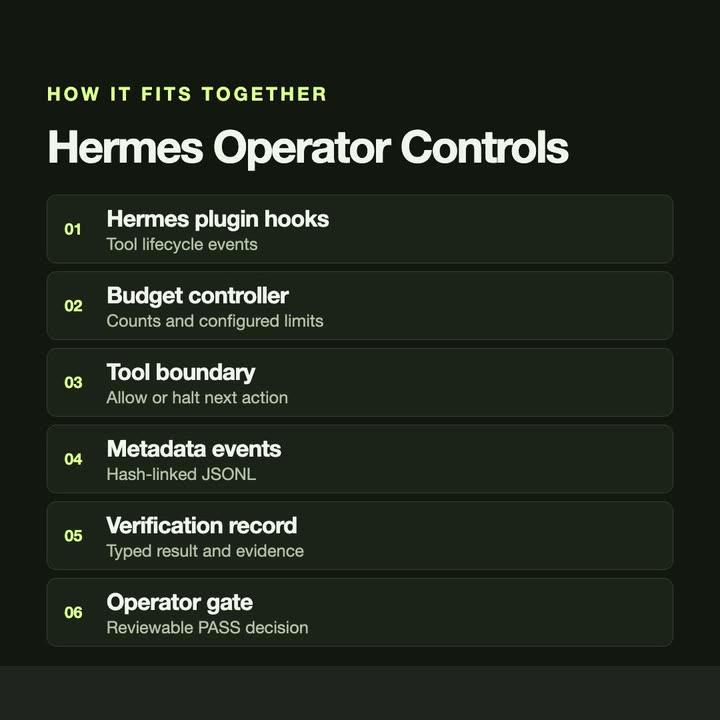
How it fits together.
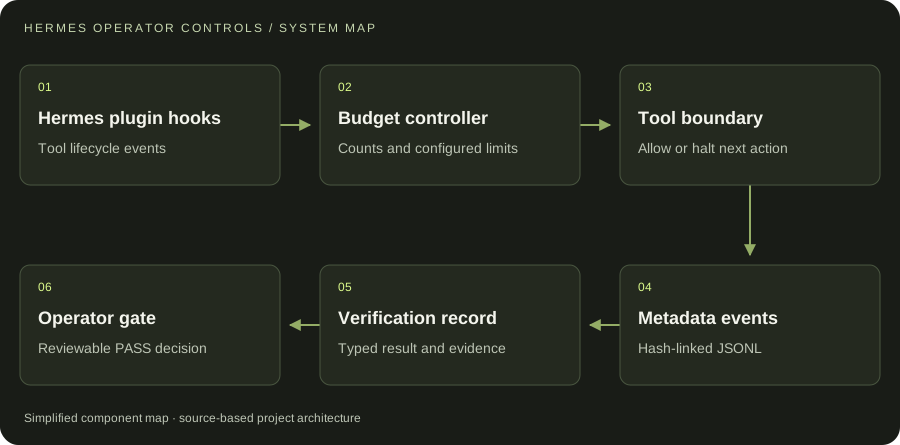
Plugin hooks observe tool events. The budget controller gates subsequent tool actions, while telemetry and verification records support operator review.
Swipe or scroll the diagram to inspect it. The components are also listed below.
- 01Hermes plugin hooks
Tool lifecycle events
- 02Budget controller
Counts and configured limits
- 03Tool boundary
Allow or halt next action
- 04Metadata events
Hash-linked JSONL
- 05Verification record
Typed result and evidence
- 06Operator gate
Reviewable PASS decision
START WITH ONE EMAIL
Need something
like this?
Tell us what you would use it for. The four lines on the right are enough to start.
There is no form to fill in and nothing to sign up for.
WHAT TO PUT IN IT
- The taskWhat is done by hand today, and how often.
- The toolsWhere the data lives: files, sheets, apps.
- The resultWhat a good outcome looks like for you.
- The timingWhen you need it.
The button opens your email app with the four questions already in the message. Examples: how to write a software brief.